
# ディレクトリのパスを指定します
$targetDirectory = "C:\testuser\Directory\Path"

# ディレクトリ内の各サブディレクトリのサイズを取得して一覧表示します
Get-ChildItem -Path $Path -Recurse -Directory | ForEach-Object {
    $directory = $_
    $directorySize = (Get-ChildItem -Path $directory.FullName -File -Recurse | Measure-Object -Property Length -Sum).Sum
    [PSCustomObject]@{
        DirectoryName = $directory.Name
        SizeInBytes = $directorySize
        SizeInKB = [math]::Round($directorySize / 1KB, 2)
        SizeInMB = [math]::Round($directorySize / 1MB, 2)
        SizeInGB = [math]::Round($directorySize / 1GB, 2)
    }
} | Format-Table -AutoSize
$targetDirectory 変数にディレクトリのパスを指定
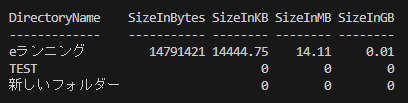
サイズはバイト、キロバイト、メガバイト、ギガバイトの単位で表示されます。
コメント